Strengthen your Computer and IT preparation with this second revision practice set for Police Constable and Police SI examinations. Practise 20 objective questions covering computer knowledge and information technology concepts, with answers and explanations to improve accuracy and reinforce essential concepts.
Test Details
Topic: Computer and IT
Total Questions: 20
Question Format: MCQs – Single Correct Answer
Suitable for: Police Constable, Police SI
Download All Papers in This Series (PDF)
Questions and Answers
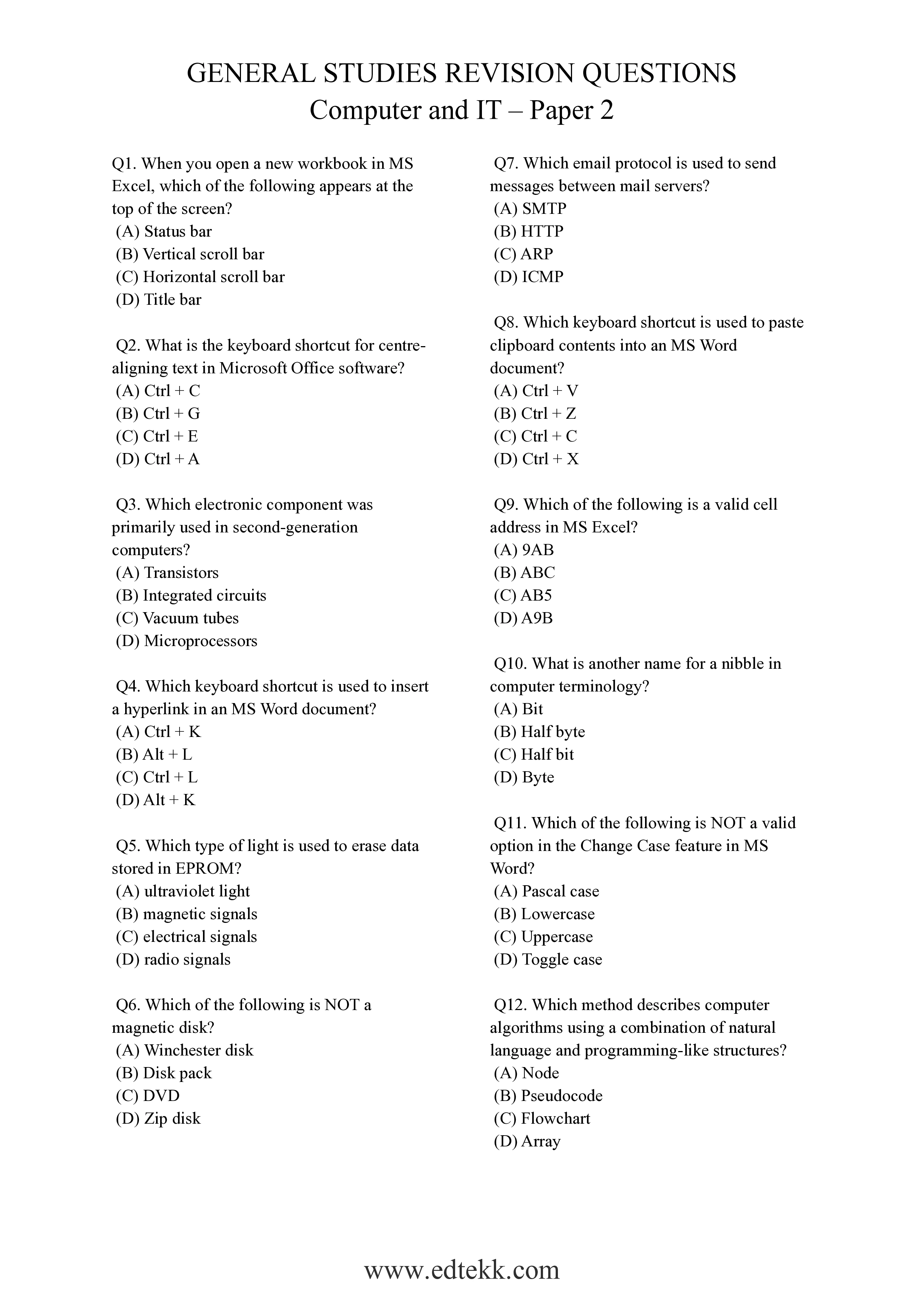
Q1. When you open a new workbook in MS Excel, which of the following appears at the top of the screen?
(A) Status bar
(B) Vertical scroll bar
(C) Horizontal scroll bar
(D) Title bar
Explanation: The Title Bar is located at the top of the Excel application window. It displays information such as the workbook name and Microsoft Excel, along with window-management controls.
Q2. What is the keyboard shortcut for centre-aligning text in Microsoft Office software?
(A) Ctrl + C
(B) Ctrl + G
(C) Ctrl + E
(D) Ctrl + A
Explanation: Ctrl + E is the keyboard shortcut for centre alignment in Microsoft Word. It centres the selected paragraph or the paragraph containing the cursor between the left and right margins. Other alignment shortcuts include Ctrl + L for left, Ctrl + R for right and Ctrl + J for justified alignment.
Q3. Which electronic component was primarily used in second-generation computers?
(A) Transistors
(B) Integrated circuits
(C) Vacuum tubes
(D) Microprocessors
Explanation: Second-generation computers (approximately 1956–1963) primarily used transistors instead of vacuum tubes. Transistors made computers smaller, faster, more reliable and energy-efficient. Integrated circuits became the defining technology of third-generation computers, while microprocessors characterised fourth-generation computers.
Q4. Which keyboard shortcut is used to insert a hyperlink in an MS Word document?
(A) Ctrl + K
(B) Alt + L
(C) Ctrl + L
(D) Alt + K
Explanation: Ctrl + K is the keyboard shortcut for inserting or editing a hyperlink in MS Word. It opens the hyperlink interface, where a link can be assigned to text or other document content.
Q5. Which type of light is used to erase data stored in EPROM?
(A) ultraviolet light
(B) magnetic signals
(C) electrical signals
(D) radio signals
Explanation: EPROM (Erasable Programmable Read-Only Memory) is a non-volatile semiconductor memory that retains stored information even when the power is switched off. Its contents can be erased by exposing the memory chip to ultraviolet light and subsequently reprogrammed. Therefore, ultraviolet light is used to erase EPROM data.
Q6. Which of the following is NOT a magnetic disk?
(A) Winchester disk
(B) Disk pack
(C) DVD
(D) Zip disk
Explanation: A DVD (Digital Versatile Disc) is an optical storage medium that uses laser technology to read and, depending on the disc type, write data. Disk packs, Winchester disks and Zip disks use magnetic recording technology. Therefore, DVD is the correct answer because it is not a magnetic disk.
Q7. Which email protocol is used to send messages between mail servers?
(A) SMTP
(B) HTTP
(C) ARP
(D) ICMP
Explanation: Simple Mail Transfer Protocol (SMTP) is used to send email messages between mail servers and from email clients to outgoing mail servers. HTTP transfers web resources, ARP maps IP addresses to MAC addresses on local networks, and ICMP supports network diagnostics and error reporting.
Q8. Which keyboard shortcut is used to paste clipboard contents into an MS Word document?
(A) Ctrl + V
(B) Ctrl + Z
(C) Ctrl + C
(D) Ctrl + X
Explanation: Ctrl + V is the standard keyboard shortcut for pasting clipboard contents into a Microsoft Word document. Ctrl + C copies selected content, Ctrl + X cuts selected content, and Ctrl + Z reverses the most recent action.
Q9. Which of the following is a valid cell address in MS Excel?
(A) 9AB
(B) ABC
(C) AB5
(D) A9B
Explanation: AB5 is a valid Excel cell address because it consists of a column reference (AB) followed by a row number (5). A valid cell reference uses one or more letters to identify the column and a positive integer to identify the row.
Q10. What is another name for a nibble in computer terminology?
(A) Bit
(B) Half byte
(C) Half bit
(D) Byte
Explanation: A nibble is a group of four bits, equivalent to half a byte. Since one byte conventionally consists of eight bits, a nibble is also known as a half-byte. Nibbles are commonly used in hexadecimal representation because each hexadecimal digit corresponds to exactly four binary bits.
Q11. Which of the following is NOT a valid option in the Change Case feature in MS Word?
(A) Pascal case
(B) Lowercase
(C) Uppercase
(D) Toggle case
Explanation: Pascal case is not one of the standard Change Case options in Microsoft Word. The standard options include Sentence case, lowercase, UPPERCASE, Capitalize Each Word and tOGGLE cASE. Pascal case is a programming-related naming convention in which each word begins with a capital letter and spaces are omitted.
Q12. Which method describes computer algorithms using a combination of natural language and programming-like structures?
(A) Node
(B) Pseudocode
(C) Flowchart
(D) Array
Explanation: Pseudocode is an informal method of describing algorithms using a combination of natural language and programming-like structures. It represents the logical steps of an algorithm without following the strict syntax of any particular programming language. It helps programmers plan, understand, and communicate algorithms before implementing them in actual code.
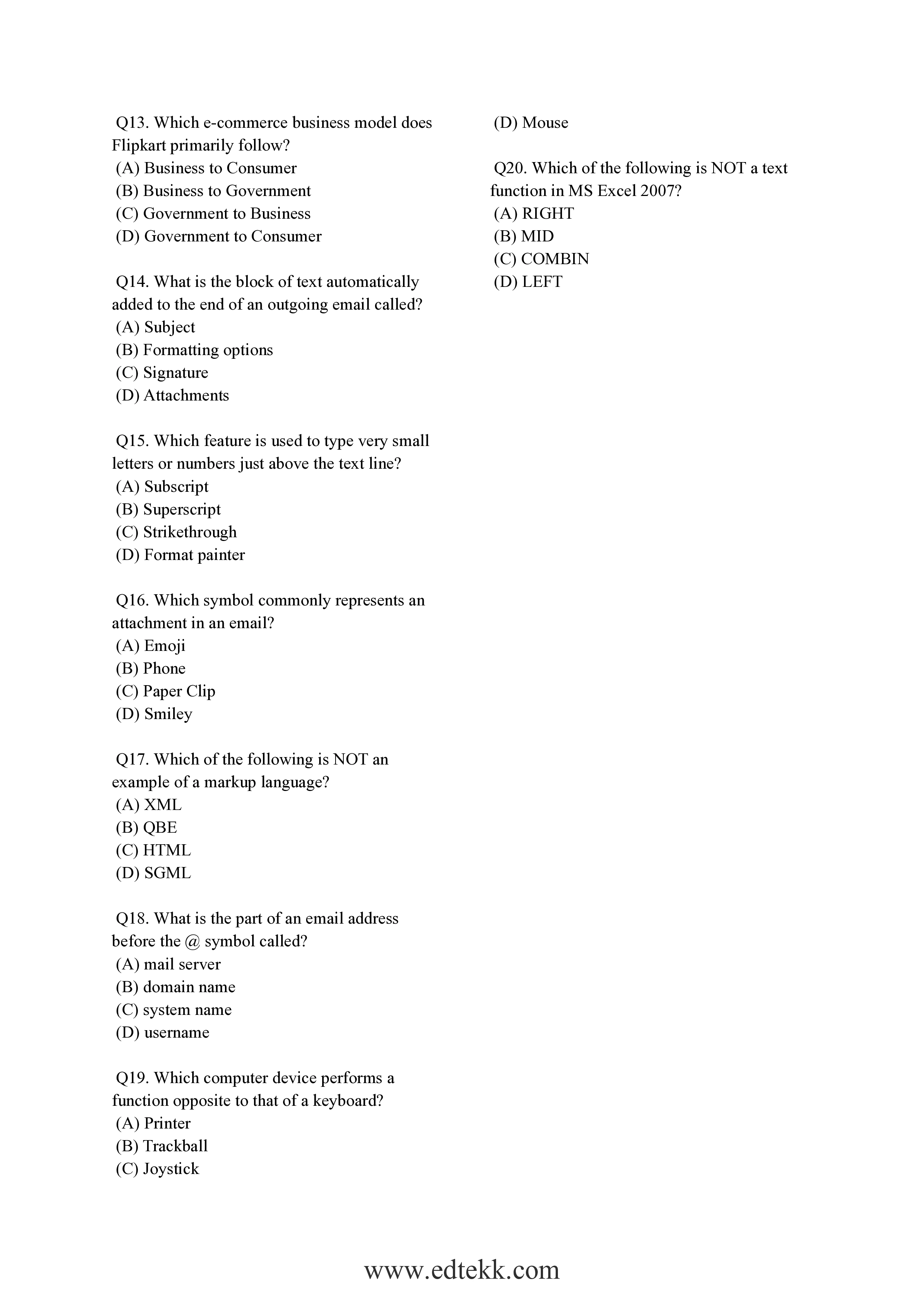
Q13. Which e-commerce business model does Flipkart primarily follow?
(A) Business to Consumer
(B) Business to Government
(C) Government to Business
(D) Government to Consumer
Explanation: Flipkart operates as an online marketplace connecting businesses and sellers with individual consumers. This model is classified as Business to Consumer (B2C) when businesses sell goods or services to end customers. Flipkart primarily represents the B2C e-commerce model.
Q14. What is the block of text automatically added to the end of an outgoing email called?
(A) Subject
(B) Formatting options
(C) Signature
(D) Attachments
Explanation: An email signature is a block of text automatically added to the end of outgoing messages. It commonly contains the sender’s name, designation, organisation and contact details. Most email applications allow users to create and configure a default signature for their outgoing emails.
Q15. Which feature is used to type very small letters or numbers just above the text line?
(A) Subscript
(B) Superscript
(C) Strikethrough
(D) Format painter
Explanation: Superscript displays small letters or numbers slightly above the normal text line. It is commonly used for mathematical powers, ordinal indicators and scientific notations, such as x² and 1st. Subscript, in contrast, places characters below the normal text line.
Q16. Which symbol commonly represents an attachment in an email?
(A) Emoji
(B) Phone
(C) Paper Clip
(D) Smiley
Explanation: A paperclip is the commonly used icon to represent an email attachment. It indicates that a file, such as a document, image or spreadsheet, has been attached to a message. Clicking the attachment indicator generally allows users to view or download the attached file.
Q17. Which of the following is NOT an example of a markup language?
(A) XML
(B) QBE
(C) HTML
(D) SGML
Explanation: XML (Extensible Markup Language), HTML (HyperText Markup Language), and SGML (Standard Generalized Markup Language) are markup languages used to structure and describe documents or data. QBE (Query by Example), however, is a database query technique that allows users to retrieve information by specifying examples or conditions. Therefore, QBE is not a markup language.
Q18. What is the part of an email address before the @ symbol called?
(A) mail server
(B) domain name
(C) system name
(D) username
Explanation: The first part of a standard email address, appearing before the @ symbol, is called the local part or username. It identifies a particular mailbox within a domain. For example, in student@gmail.com, “student” is the local part and “gmail.com” is the domain.
Q19. Which computer device performs a function opposite to that of a keyboard?
(A) Printer
(B) Trackball
(C) Joystick
(D) Mouse
Explanation: A printer is an output device, functionally contrasting with a keyboard, which is an input device. A keyboard sends text and commands to a computer, whereas a printer produces hard-copy output on paper. A mouse, trackball and joystick are also input devices.
Q20. Which of the following is NOT a text function in MS Excel 2007?
(A) RIGHT
(B) MID
(C) COMBIN
(D) LEFT
Explanation: COMBIN is not a text function in Microsoft Excel 2007; it belongs to the Math & Trig function category and calculates the number of combinations for a given number of objects. RIGHT, MID and LEFT are text functions used to extract characters from the right, middle and left portions of a text string, respectively.
Question Paper Images